Spa showing offline on SmartLINK app
If you spa is suddenly showing as offline on the SmartLINK app, follow the below steps.
Please Note: If you have recently changed your internet router or Wi-Fi password your spa will display as [offline] on your SmartLink app. This is because the SmartLink module was paired with the old router / previous password. To get your spa back online your must;
- Delete the [offline] spa from the list on your app.
- Go through the set up procedure again to pair the SmatLink module with your new router / password. Refer to SmartLink User Manual
V3 SmartLINK Modules
For a V3 module we recommend simply powering down the entire spa at the isolation switch for 10 seconds, then turning it back on again. This should force the module to reconnect to your home router.
When you’re able to successfully go through the set-up procedure yet the spa never shows as online, it usually means your router has blocked the connection. The most common reason a router will block internet connection is entering the incorrect password.
Please note, if you mistype your network password our app will just proceed to the next step. You won’t receive an ‘incorrect password’ message. We recommend copy & pasting your network password to prevent typos.
SmartTOUCH Touchpad fitted
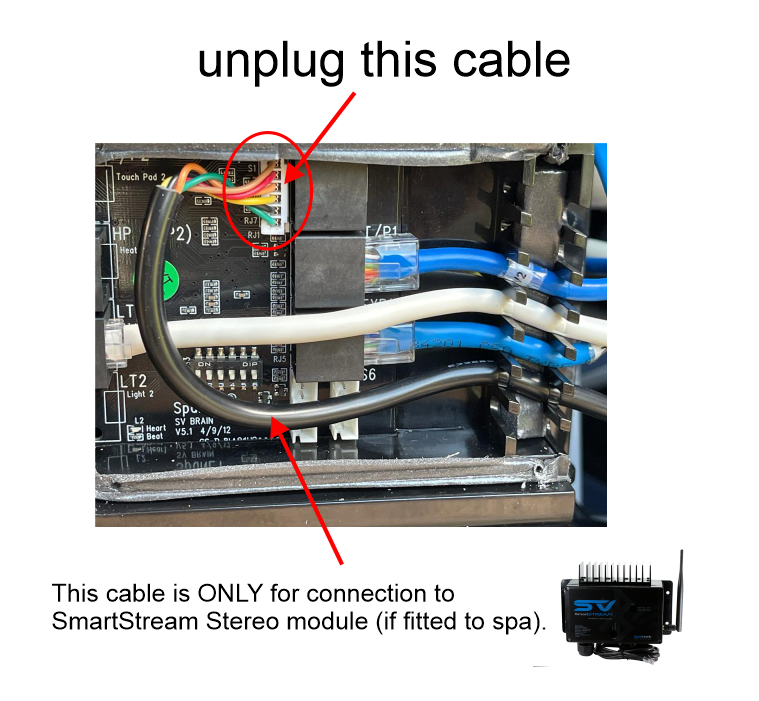
If your spa is fitted with a SmartTOUCH touchscreen keypad, you must ensure the black stereo lead is not plugged into the programming socket on your spa controllers 12v Brain PCB. The black cable is to be plugged into a SmartStream Stereo only, if fitted. For spas not fitted with a SmartStream stereo, simply leave this cable unplugged & tied up in a safe position. Refer to image below.